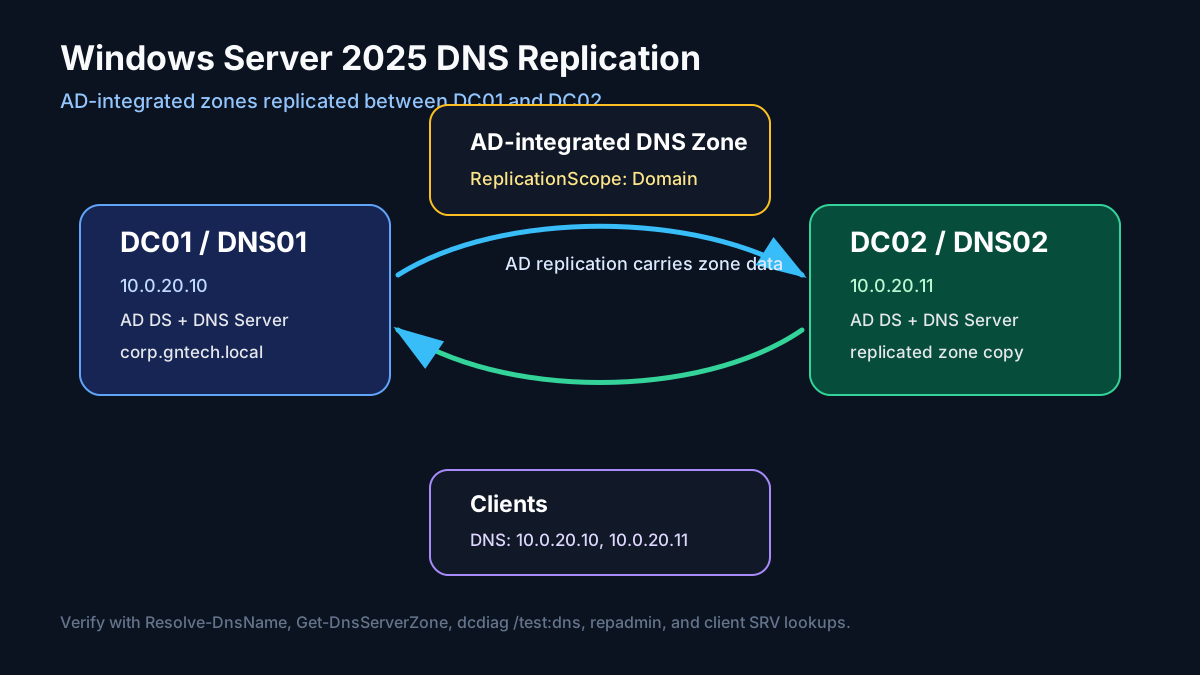
DNS is not optional in Active Directory. Domain joins, Kerberos, LDAP, Group Policy, Global Catalog discovery, and replication all depend on DNS SRV records. If DNS is wrong, Active Directory looks broken even when the DCs are healthy.
This guide configures Windows Server 2025 DNS with Active
Directory-integrated replication between DC01 and DC02. It covers the
GUI path, the Server Core/PowerShell path, forward and reverse zones,
secure dynamic updates, DNS forwarders, client DNS settings, and real
verification.

Image placeholders to add later:
- Screenshot: Server Manager DNS role installed on both DCs
- Screenshot: DNS Manager showing
gntech.meonDC01- Screenshot: zone properties showing Store the zone in Active Directory
- Screenshot: replication scope set to domain DNS servers
- Screenshot: secure dynamic updates enabled
- Screenshot: reverse lookup zone creation wizard
- Screenshot: DNS forwarders tab
- Screenshot:
_msdcs,_sites,_tcp, and_udpSRV folders- Screenshot:
Resolve-DnsName,dcdiag /test:dns, andrepadminsuccess
GUI vs Server Core Path
This guide covers both styles:
- Desktop Experience / GUI: DNS Manager, Server Manager, zone wizards, and properties dialogs.
- Server Core / PowerShell:
Install-WindowsFeature,Add-DnsServerPrimaryZone,Set-DnsServerPrimaryZone,Resolve-DnsName, anddcdiag.
Use GUI when documenting screenshots. Use PowerShell when building repeatable Windows infrastructure.
Target Design
| Item | Value |
|---|---|
| Domain | gntech.me |
| DNS/DC 1 | DC01 / 10.0.20.10 |
| DNS/DC 2 | DC02 / 10.0.20.11 |
| Forward zone | gntech.me |
| Reverse zone | 20.0.10.in-addr.arpa |
| Replication type | AD-integrated |
| Replication scope | Domain DNS servers |
| Dynamic updates | Secure only |
| Client DNS | 10.0.20.10, 10.0.20.11 |
For Active Directory, the cleanest DNS replication model is AD-integrated DNS. The zone lives in AD DS and replicates through Active Directory replication. Any domain controller running the DNS Server role can answer the zone, and updates can be accepted securely.
Pre-Checks
Before touching DNS, verify both domain controllers are healthy:
|
|
Expected:
DC01andDC02are listed- replication has no failures
- DNS tests pass or only show non-critical external forwarder warnings
Install DNS Server Role
If DNS was installed during DC promotion, this is already done. Verify first:
|
|
GUI: Server Manager
- Open Server Manager.
- Go to Manage → Add Roles and Features.
- Select the local server.
- Select DNS Server.
- Accept management tools and install.
Image placeholder: Add screenshot of the DNS Server role selected in Server Manager.
Server Core / PowerShell
|
|
Verify service status:
|
|
Expected:
|
|
Create or Confirm the Forward Zone
If this domain was created with AD DS, the forward zone probably already exists. Check it:
|
|
Expected zone:
|
|
GUI: DNS Manager
- Open Server Manager → Tools → DNS.
- Expand
DC01→ Forward Lookup Zones. - Confirm
gntech.meexists. - Right-click the zone → Properties.
- Confirm Type is Active Directory-Integrated.
- Confirm Dynamic updates is Secure only.
- Click Replication and select the domain DNS replication scope.
Image placeholder: Add screenshot of zone properties showing AD-integrated storage and secure dynamic updates.
Server Core / PowerShell
If the zone does not exist, create it as AD-integrated:
|
|
If the zone exists, enforce secure dynamic updates:
|
|
Check the zone:
|
|
Create the Reverse Lookup Zone
Reverse DNS improves troubleshooting and logging. It is not required for AD logons, but it is worth configuring.
GUI: DNS Manager
- Open DNS Manager.
- Right-click Reverse Lookup Zones → New Zone.
- Choose Primary zone.
- Check Store the zone in Active Directory.
- Choose replication to DNS servers in the domain.
- Choose IPv4 Reverse Lookup Zone.
- Enter network ID
10.0.20. - Allow Secure only dynamic updates.
Image placeholder: Add screenshot of reverse lookup zone creation for
10.0.20.0/24.
Server Core / PowerShell
|
|
Verify:
|
|
Add Static Records for Infrastructure
Most domain members register dynamically. Infrastructure records should be explicit.
|
|
Verify:
|
|
Configure Forwarders
Clients should ask AD DNS. AD DNS should forward internet queries.
GUI: DNS Manager
- Right-click the DNS server → Properties.
- Open Forwarders.
- Add upstream resolvers, for example
1.1.1.1and9.9.9.9. - Repeat on both DCs, or configure through PowerShell.
Image placeholder: Add screenshot of DNS forwarders configured on
DC01andDC02.
Server Core / PowerShell
|
|
Verify:
|
|
Client DNS Configuration
Domain-joined clients must use AD DNS first. Configure DHCP option 6 or static client DNS with both DCs:
|
|
Do not hand out public DNS servers directly to Windows clients in an AD
domain. Public DNS cannot resolve _ldap._tcp.dc._msdcs.gntech.me.
Verify DNS Replication
Create a test record on DC01:
|
|
Force AD replication:
|
|
Query both DNS servers:
|
|
Remove the test record:
|
|
Force replication again and verify it disappears from both servers.
Verify AD SRV Records
These records are what domain clients actually use:
|
|
Expected: records for both domain controllers where appropriate.
Run DCDIAG DNS Tests
|
|
A healthy result validates delegation, dynamic updates, SRV records, and basic DNS service health.
Verify Replication Layer
Because AD-integrated DNS rides AD replication, check AD replication too:
|
|
No DNS replication design is healthy if AD replication is failing.
Standard Secondary Zones vs AD-Integrated Zones
For domain DNS, use AD-integrated zones. Standard primary/secondary DNS zones still exist, but they replicate by DNS zone transfer, not AD replication.
Use standard secondary zones only for non-AD DNS designs, DMZ DNS, or special cases where a non-domain DNS server needs a read-only copy.
For AD domain controllers:
|
|
Final Verification Script
|
|
Summary
For Windows Server 2025 domain DNS:
- Run DNS on at least two domain controllers
- Use AD-integrated zones
- Use secure dynamic updates
- Replicate zones to DNS servers in the domain
- Configure reverse lookup zones
- Point clients to both AD DNS servers
- Verify SRV records,
dcdiag /test:dns, and AD replication
DNS replication is not just a DNS feature in Active Directory. It is AD replication plus DNS Server health. Validate both.