Series: GNTECH Infrastructure Deployment Series · Part 01 of 12 · Next: Part 02 — Hetzner Proxmox Foundation (planned)
A hybrid homelab is easy to start and difficult to keep safe: a hypervisor needs management access, a virtual router needs a WAN path, applications need DNS and identity, and backups need to remain usable when the primary site fails. Before running any installer, decide which component owns each route, address, trust boundary, and recovery mechanism.
This guide presents a generic, reproducible architecture inspired by GNTECH’s design goals, not an export of its production configuration. All networks and identities below are examples. No live infrastructure was changed or validated for this article.
1. Define the outcome
Our target has two physical locations:
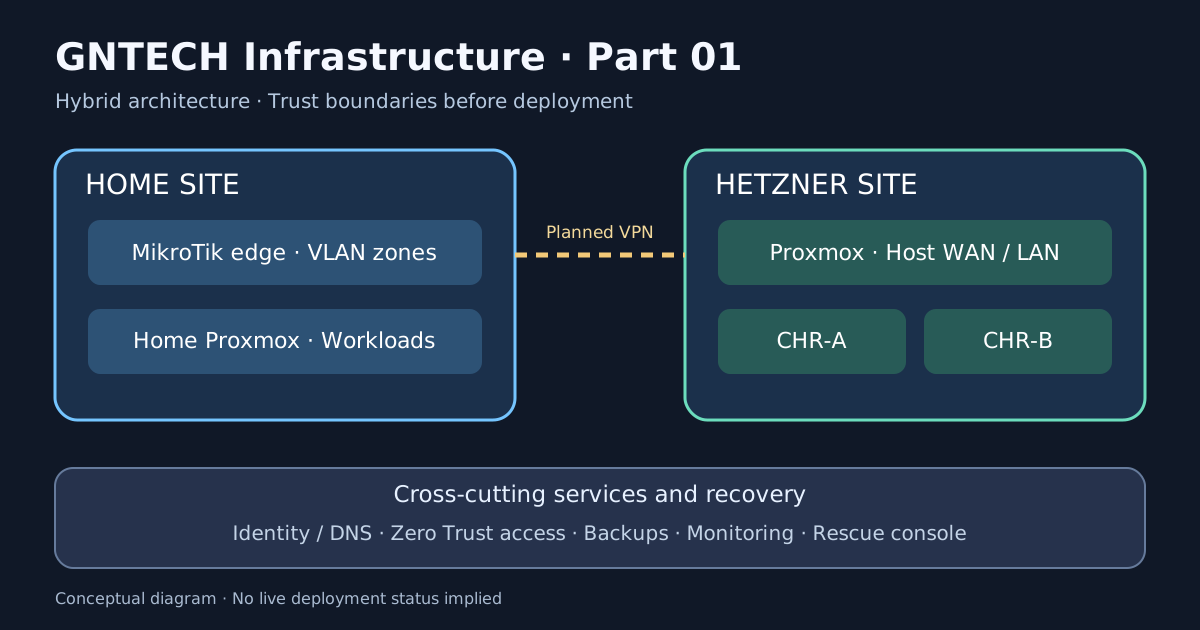
- Home site: a Proxmox node, MikroTik edge router, VLAN-aware switch, user devices, and optional backup storage.
- Hetzner site: a Proxmox node, provider WAN, two independent MikroTik CHR transit networks, and a separate general-purpose VM LAN.
- Shared services: directory/identity, authenticated remote administration, monitoring, and a backup-and-restore process.
A virtual router is not an alternative recovery path for its own hypervisor. The host must retain a management and rescue method that works even if every CHR VM is powered off.
2. Inventory before allocating IPs
Create a small source-of-truth table. For each host or router record: owner, physical site, operating system, management interface, storage, power dependencies, DNS name, recovery method, and backup target. Do not publish real management IPs, serial numbers, public addresses, or secrets.
| Role | Example name | Recovery dependency |
|---|---|---|
| Home hypervisor | HOME-PVE | Local console or independent management |
| Hetzner hypervisor | DC-PVE | Hetzner console/rescue access |
| Home edge router | HOME-RTR | Local access and saved RouterOS export |
| Hosted virtual routers | CHR-A / CHR-B | DC-PVE console and disk backup |
| Directory / DNS | ID-01 | Independent administrative credentials |
| Backup service | BACKUP-01 | Restore keys and off-site copy |
| Monitoring | OBS-01 | Alerts to a destination outside the failed site |
3. Plan distinct network zones
Documentation-only examples: RFC 1918 private subnets and RFC 5737 public ranges are used to explain relationships. They are not copied from an actual GNTECH deployment.
| Zone | Example CIDR | Boundary |
|---|---|---|
| Home users | 10.10.10.0/24 |
Internet and explicitly approved services |
| Home servers | 10.10.20.0/24 |
Restricted inbound from users |
| Home IoT | 10.10.40.0/24 |
No default access to management |
| Home management | 10.10.99.0/24 |
Admin-only access |
| Hetzner CHR-A transit | 10.255.1.0/30 |
Host ↔ CHR-A only |
| Hetzner CHR-B transit | 10.255.2.0/30 |
Host ↔ CHR-B only |
| Hetzner VM LAN | 10.3.0.0/24 |
Host-gated outbound access |
| CHR-A workload LAN | 10.11.0.0/24 |
CHR-A-owned routing policy |
| CHR-B workload LAN | 10.12.0.0/24 |
CHR-B-owned routing policy |
Keep the CHR workload LANs on different internal bridges. A transit bridge is not a general-purpose VM switch. Avoid overlapping CIDRs across sites if you intend to route them over a VPN.
Address ownership and public routing
In the routed-CHR pattern, the Hetzner host retains its provider-configured WAN interface. Each CHR has a /30 point-to-point transit connection. Provider-routed additional public IPv4 addresses can be directed via host /32 routes to the relevant CHR peer, only when the provider confirms that routing model for the purchased IP allocation.
Do not assume that a Hetzner additional IP, subnet, virtual MAC, or IPv6 prefix is interchangeable. The exact provider requirements belong in Part 02 and Part 03, after checking the current product documentation.
4. Map the control plane separately from data traffic
| Plane | Example traffic | Protection |
|---|---|---|
| Management | Admin → Proxmox API/SSH, RouterOS, VM consoles | MFA, narrowly scoped identity, private access, independent rescue |
| Data | Clients → apps, app → database, routed inter-site traffic | Zone policies, least privilege, explicit egress |
| Identity | Clients/services → DNS, AD DS, Entra integrations | Resilient DNS, time sync, separate break-glass credentials |
| Backup | Hypervisors/guests → backup target | Restricted write access, immutable/offline copy where feasible, restore testing |
| Telemetry | Exporters/logs → collectors → alerts | Read-only exporters, limited retention and credentials |
Cloudflare Tunnel and Zero Trust can protect selected administrative paths, but should not be the only way to regain control of a broken router or hypervisor. An identity outage must not prevent emergency recovery.
5. Build a dependency order
- Recovery first: confirm provider rescue, local console, and configuration backups.
- Foundation: install the hypervisor, storage, host WAN, and time synchronization.
- Network: add isolated bridges, transit routing, firewall, and test VMs.
- Identity: deploy DNS and directory services with a break-glass path.
- Secure access: add tunnels, SSO, MFA, and device restrictions.
- Applications: deploy reverse proxy and containers only after segmentation works.
- Resilience: configure backup targets, off-site copies, and restore tests.
- Observability: instrument every critical dependency and test alert delivery.
Do not deploy the monitoring system as the sole proof that the monitoring system is healthy. Include external checks where feasible.
6. Write a threat and failure model
| Scenario | Design response | Test |
|---|---|---|
| CHR-A stops | Host console remains accessible | Power off CHR-A in maintenance and reach DC-PVE via recovery channel |
| Wrong firewall rule | Safe rollback from independent console | Apply a temporary deny in a test zone and restore |
| Tunnel or identity outage | Break-glass management path | Simulate unavailable tunnel in a controlled window |
| Home ↔ Hetzner VPN fails | No accidental routing or DNS leak | Disable tunnel and inspect routes and policy |
| Backup target unavailable | Workloads continue; alert fires | Disconnect test target, verify alert and retry |
| Hypervisor storage loss | Recover from separate copy | Restore disposable VM to isolated host/storage |
The table is a future acceptance test plan, not evidence that those tests have passed.
7. Record your design in a repository
A small text-first design repository is enough to begin. This is a local, non-destructive scaffold; it creates files in a new directory and does not configure any infrastructure:
|
|
Inspect the result:
|
|
This scaffold does not include real credentials, network configurations, or public addresses. Replace sample subnets only after checking that they do not conflict with existing site networks.
8. Architecture review checklist
Before Part 02, you should be able to answer:
- Which route owns each subnet and public IP?
- Which systems can access hypervisor management ports?
- What works when both CHRs are down?
- How do you reach Hetzner rescue without relying on the VPN?
- Which DNS and identity components must start first?
- Which backup copy survives losing either site?
- Which test proves that an unauthorized zone cannot reach another zone?
If an answer is missing, fix the diagram and inventory before configuring live routing.
Next in the series
Part 02 — Hetzner Proxmox Foundation will cover installation choices, storage, WAN configuration, safe remote administration, and recovery checkpoints. For an existing practical router example, see the dual-CHR Hetzner tutorial.