
Series: GNTECH Infrastructure Deployment Series · Part 07 of 12 · Previous: Part 06 — Active Directory and DNS · Next: Part 08 — Cloudflare Zero Trust
Hybrid identity connects an on-premises Active Directory forest to Microsoft Entra ID so people can use a consistent identity across local and cloud services. Synchronization provisions directory objects and selected attributes. It is not a directory backup, and it does not automatically make every application use single sign-on (SSO).
This guide is a deployment plan and pilot checklist, not a claim that synchronization has been configured or tested for GNTECH. Part 06’s corp.example.test forest is an isolated lab example and must not be synchronized to a production tenant. Use a tenant and a DNS domain you control, and treat the sync host as a Tier 0 identity component.
Verification status
| Evidence area | Status |
|---|---|
| Environment | Documentation-only design; no GNTECH tenant, production domain, sync agent, or sign-in flow was changed for this article. |
| Previously reported lab observations | Part 06 describes an isolated AD DS lab. Those observations do not establish hybrid synchronization behavior. |
| Preparation checks | Microsoft’s current architecture, prerequisites, staged rollout, and Conditional Access guidance were reviewed. The article and diagram are prepared for publication checks. |
| Still to verify | Tenant licensing and roles, domain and attribute readiness, chosen sync features, sign-in behavior, Conditional Access impact, monitoring, and recovery in the reader’s own controlled pilot. |
Architecture and boundaries
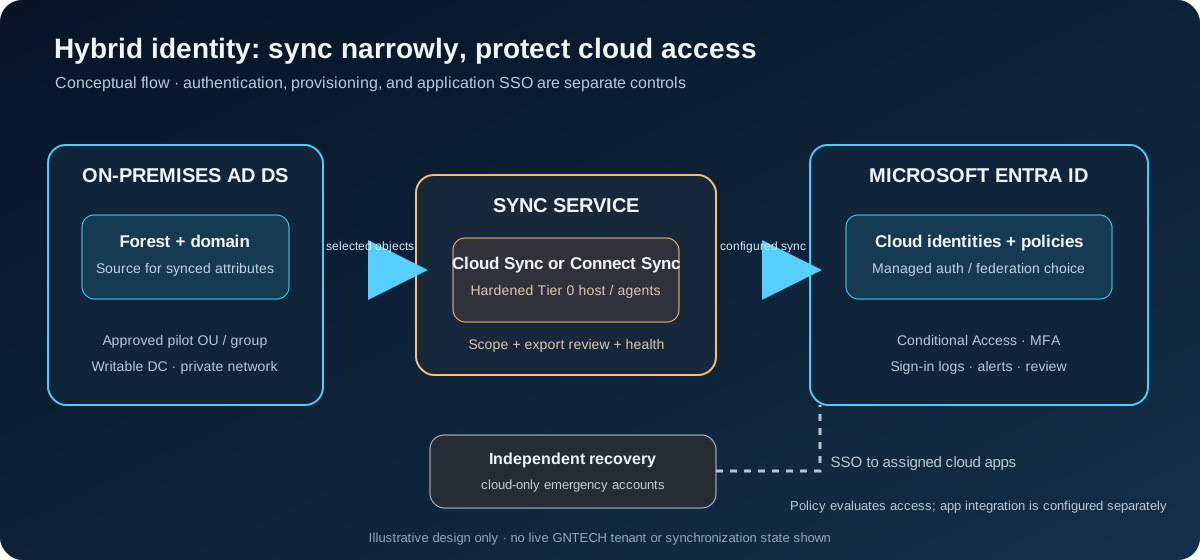
The directory remains the source of authority for synchronized attributes. The synchronization service sends only the configured objects and attributes to the tenant. Microsoft Entra ID then evaluates cloud authentication and access policies; applications integrate through their supported SSO protocol. The exact flow depends on whether the organization chooses Password Hash Synchronization (PHS), Pass-through Authentication (PTA), or federation.
Keep emergency access identities cloud-only and independent of the on-premises forest and sync host. Preserve a separate administrative recovery path for the tenant and for Active Directory. A sync server compromise can affect cloud identity, so protect it like a domain controller or other control-plane asset.
1. Choose the synchronization path
Start with Microsoft’s current hybrid scenario comparison and, if evaluating a migration, the Cloud Sync decision guide. Do not install both engines as an experiment over the same objects. A migration needs a documented, supported transition plan and deliberate object scoping.
| Path | Consider it when | Design questions |
|---|---|---|
| Microsoft Entra Cloud Sync | Cloud-managed configuration, multiple active agents, or disconnected forest scenarios fit the required feature set. | Do its current feature limits cover device, group, Exchange hybrid, writeback, and any specialized scenarios you depend on? |
| Microsoft Entra Connect Sync | Your requirements need capabilities or scenarios that the current comparison assigns to Connect Sync, such as some complex multi-forest patterns or larger directories. | Can you operate its dedicated sync server, update lifecycle, database, and tightly controlled staging/failover process? |
| No directory synchronization | There is no requirement for on-premises identities to drive cloud identities. | Can cloud-only lifecycle and access governance meet the need without creating duplicate accounts? |
The comparison changes as Microsoft adds capabilities. Record the exact use cases, object counts, forests, device-join requirements, Exchange dependencies, writeback needs, recovery expectations, and licensing before choosing. Do not select a method solely because it is already familiar.
2. Decide how cloud sign-in will work
Synchronization and authentication are separate design choices. Choose the method against availability and security requirements, then test it with a small pilot group.
- Password Hash Synchronization (PHS) synchronizes a derived hash representation so Microsoft Entra can authenticate users in the cloud. It does not send a user’s clear-text password to the tenant. Confirm the security, password policy, and recovery implications with your identity owner.
- Pass-through Authentication (PTA) validates passwords against on-premises Active Directory through authentication agents. Plan agent availability, outbound connectivity, monitoring, and a tested recovery/sign-in path if those agents or the site are unavailable.
- Federation delegates authentication to a separate identity provider. Use it only where requirements justify operating its additional certificates, endpoints, monitoring, and recovery dependencies.
Do not configure more sign-in methods than the intended supported design. For a federated environment, Microsoft’s Staged Rollout feature can test cloud authentication with a selected group before a domain-wide transition. It is a temporary migration/testing tool, not a permanent mixed sign-in model. Staged Rollout is also distinct from putting an Entra Connect Sync server in staging mode: the first concerns selected users’ authentication; the second prevents a sync server from exporting changes.
3. Prepare the tenant and directory
Before installing an agent or enabling a sync configuration:
- Confirm the tenant is the intended tenant. Add and verify the routable DNS domain that user sign-in names will use; do not use the reserved
.testname from the Part 06 lab. - Confirm that a directly assigned administrator role meets the current setup requirements. Use a dedicated administrative account, a managed workstation, and an approved change record. Avoid daily browsing with privileged accounts.
- Inventory forests, domains, users, groups, UPN suffixes, duplicate attributes, devices, Exchange dependencies, service accounts, and current cloud-only objects. Use Microsoft’s IdFix guidance/tool to find directory data issues before synchronization.
- Decide exactly which OUs or groups and attributes belong in scope. Start with a small, dedicated pilot population; validate matching rules so an on-premises object is not accidentally matched to or made authoritative for the wrong cloud object.
- Document who approves scope changes, who monitors sync health, how to pause expansion, and how to recover tenant and on-premises access independently.
Microsoft’s current Connect Sync prerequisites page includes a dated service requirement: Connect Sync version 2.6.84.0 or later and application-based authentication are required by April 7, 2027. Recheck that page and the tenant’s current notices before deployment because product requirements can change.
4. Place and protect the sync service
For Connect Sync, use a dedicated, domain-joined, fully patched Windows Server with a full GUI in a protected control-plane segment. Microsoft recommends Windows Server 2025 or 2022 and treats the server as Tier 0. Restrict interactive and administrative access, use separate privileged accounts, keep a tested recovery path, and monitor changes to the server, service, sync rules, scope, and tenant application credentials. Do not host an unrelated public-facing service on it.
For Cloud Sync, place each provisioning agent on a hardened, domain-joined supported server with required DNS and outbound connectivity. The current prerequisites recommend Windows Server 2025 or 2022 and recommend three active agents for high availability. Multiple agents do not replace monitoring, capacity planning, or recovery tests. Review the live Cloud Sync prerequisites for the current server, role, schema, network, and service-account requirements.
Use Microsoft’s current firewall and endpoint allowlists for the selected engine. Do not insert TLS inspection or packet decryption between the sync service and Microsoft Entra endpoints where Microsoft’s guidance says it is unsupported. Store credentials and certificates only in approved secret-management systems; never put them in a script, screenshot, issue, or repository.
5. Run a controlled pilot
Use a change window and a reversible scope. The following is a review sequence, not a command to enable synchronization in an unknown tenant:
- Capture the baseline. Export the selected tool’s existing configuration and record tenant ID, forest/domain names, server/agent versions, current sync status, current authentication method, and the pilot group’s membership. Keep these records private.
- Validate input data. Resolve duplicate UPNs and proxy addresses, confirm the chosen UPN suffix is verified, and review which attributes and objects the configuration will export. Stop if the connector preview includes unexpected users, groups, or privileged identities.
- Configure one engine and a narrow scope. Use a dedicated pilot OU or security group where supported. Inspect the preview and pending exports before enabling changes. Do not begin with all users or all OUs just to prove connectivity.
- Enable only the required sync features. Confirm each optional feature, writeback direction, device scope, and permission against an explicit requirement. More enabled features mean more write paths and recovery obligations.
- Wait for a complete initial cycle and inspect results. Confirm expected pilot objects and attributes in the tenant; review export errors, duplicate/match warnings, provisioning logs, and sync health. Ensure no unsanctioned account takeover or deletion is proposed.
- Test authentication with test identities. Use a private browser session and supported clients. Confirm expected sign-in method, successful and failed login behavior, password-change behavior, and sign-in logs. If testing Staged Rollout, use a dedicated nonprivileged group and follow the current prerequisites for that specific method.
- Expand by approved cohort. Require owner sign-off on identity matching, object scope, sign-in behavior, and recovery before adding each cohort. Keep an audit trail of scope changes.
For a federated tenant, review the Staged Rollout prerequisites and limits before relying on the feature; it applies only to provisioned users and selected scenarios. For an MFA rollout, use report-only policy evaluation first and examine impact before enforcement.
6. Add SSO and MFA as separate controls
Configure each cloud application for its supported SSO method (commonly OpenID Connect or SAML) and verify its exact identifier, reply/redirect URL, claims, assignment, and logout behavior. Do not assume identity synchronization configures an app’s SSO or provisions its roles correctly. Test one representative nonprivileged account first and confirm that disabling an account or removing an assignment behaves as intended.
For MFA, Microsoft recommends a baseline Conditional Access policy for all users and all resources, with exceptions for emergency access and directory synchronization accounts, then testing in report-only mode before enforcement. Follow the current MFA policy guide and licensing requirements. Maintain at least two independently recoverable cloud-only emergency accounts, protect them with the organization’s approved emergency-access controls, monitor their use, and test them periodically. Do not exclude broad administrator groups or routine users as a shortcut.
7. Verify and operate
| Check | Expected evidence |
|---|---|
| Directory scope | Only the approved pilot objects and attributes are in scope; no unexpected delete, match, or authority change is pending. |
| Sync health | Initial and delta cycles complete; errors and export counts are reviewed and explained. |
| Authentication | Pilot users sign in using the chosen method; failures and password changes are visible in the sign-in logs and match expectations. |
| SSO | Each test application accepts the expected identity and claims; a disabled or unassigned test user is denied. |
| MFA | Report-only results show the intended users/resources, and emergency and sync account exclusions are narrowly correct before enforcement. |
| Resilience | Owners can access cloud and AD recovery paths independently; agent/service outage and recovery are rehearsed without relying on the same identity path. |
| Change control | Sync scope, rules, credentials/app authentication, agents, and Conditional Access policy changes are alerted, reviewed, and retained. |
Treat a healthy sync dashboard as evidence only that the service reports synchronization health. It does not prove that every application SSO configuration is correct, that Conditional Access is safe, or that the directory can be recovered.
Troubleshooting and rollback
| Symptom | First checks |
|---|---|
| Pilot user is missing | In-scope OU/group, attribute filtering, UPN suffix, connector import/export errors, and sync cycle status. |
| Duplicate or unexpected match | Stop scope expansion; inspect immutable IDs and matching rules with the identity owner before changing source authority. |
| User has wrong sign-in path | Confirm the user’s rollout membership, domain auth mode, chosen method, client support, and sign-in logs. |
| MFA unexpectedly blocks access | Use report-only results and sign-in logs; verify policy assignments, exclusions, registration state, and emergency access. |
| Agent/server is unavailable | Confirm whether another supported agent/server is healthy, check outbound connectivity and event/provisioning logs, and use the documented recovery procedure. |
If the pilot behaves unexpectedly, stop expansion and follow the engine-specific rollback or migration plan. Do not delete synchronized users, remove a production connector, toggle federation, or restore a DC snapshot as an improvised fix. Preserve logs and configuration, use a separate emergency administrator path, and involve the tenant and directory owners before changing source-of-authority relationships. After recovery, prove both sign-in and sync state before resuming.
Limits and next step
This article provides a planning and pilot framework. It does not create a tenant, configure a sync engine, validate the GNTECH domain, or prove that a particular organization’s applications support the selected SSO flow. Licensing, supported features, interfaces, and service requirements can change; use the linked Microsoft documentation as the deployment authority.
Part 08 covers Cloudflare Zero Trust and authenticated administrative access. For current context, review Part 05 — Home-to-Hetzner Connectivity and Part 06 — Active Directory and DNS.