
Series: GNTECH Infrastructure Deployment Series · Part 08 of 12 · Previous: Part 07 — Hybrid Identity · Next: Part 09 — Docker Compose and Traefik
A tunnel can make an administration page reachable without an inbound port forward. Authentication is a separate decision: the hostname needs an Access application, a narrow policy, and a protected origin. This installment joins those controls into one reviewable path.
The example publishes a single browser-based administration application at admin.example.com. The origin stays on a private network. This is a reference deployment and test procedure, not a claim that GNTECH’s production controls have been configured or verified.
1. Choose the access path
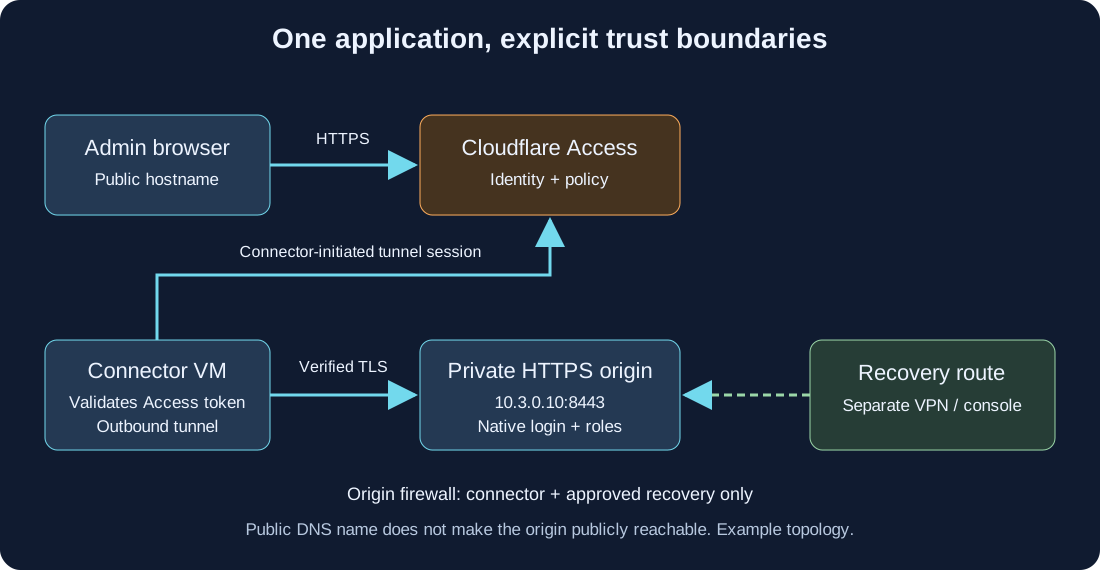
| Component | Responsibility | Boundary |
|---|---|---|
| Cloudflare Access | Evaluate identity and application policy before forwarding | Does not replace the application’s own authorization |
| Cloudflare Tunnel | Carry requests through outbound connector sessions | Does not grant a user permission to administer the origin |
| Connector VM | Reach the selected private origin | Firewall permits only required destinations and ports |
| Origin application | Verify its own user roles and perform administrative operations | Retains its own login and audit records |
| Recovery VPN or console | Restore access when the normal path fails | Must work without this tunnel and its identity provider |
This article uses a published hostname protected by Access. Its DNS name is public even though the origin address is private. Private-network access using the Cloudflare One Client, private routes, split tunnels, and Gateway policies is a different design; do not add a whole management subnet just to expose one web application.
Keep domain controllers, directory synchronization, storage replication, and site-to-site routing on the scoped network paths from Part 05. Do not publish LDAP or domain-controller services as public hostnames.
2. Prepare one origin and one recovery route
Use a patched Debian or Ubuntu connector VM, a domain managed in Cloudflare, permission to create a tunnel and Access application, and an existing identity-provider integration. Use a dedicated administrator group from the identity design in Part 07, not every account in the tenant.
The sanitized lab plan is:
| Item | Example |
|---|---|
| Browser hostname | admin.example.com |
| Private origin URL | https://10.3.0.10:8443 |
| Origin certificate identity | admin-origin.example.com |
| Trusted private CA bundle | /etc/cloudflared/origin-ca.pem |
| Connector token file | /etc/cloudflared/tunnel.token |
| Recovery | Existing scoped VPN plus provider/local console |
Replace every example with values you control. The origin must already serve HTTPS with a certificate whose subject alternative name covers the configured origin identity. Copy only its issuing CA certificate bundle, never a CA private key, to the connector. If your origin uses a publicly trusted CA, a private CA bundle may be unnecessary.
Before changing anything, test console access and the VPN route, record current DNS and firewall settings, and save the existing tunnel/application configuration privately. Keep a second administrative session open. A recovery route that uses the same Cloudflare tunnel or identity-provider login is not independent.
3. Create Access protection before publishing the route
In Cloudflare Zero Trust, add a self-hosted Access application for the exact hostname admin.example.com. Dashboard labels may change; follow the current self-hosted application guide.
Create an Allow policy that includes only the intended administrator group. Require the approved login method and, where supported and configured, the relevant device posture checks. Enforce MFA in the identity provider and test that the integration supplies any authentication claims your policy requires. Merely selecting an identity provider does not prove MFA occurred.
Cloudflare combines Include rules as alternatives and Require rules as additional conditions; Exclude rules remove matching identities. Review the complete policy evaluation rules rather than assuming policy order works like a router firewall.
Use a deliberate session duration and reauthentication policy. Do not add an Everyone or Bypass exception to resolve a failed login. Automated health checks that need authenticated HTTP access should use a separately scoped Service Auth policy and a rotated service token; protect that credential and test the token’s exact reach.
Record the application’s audience identifier (AUD) and team name for origin-side enforcement. Keep the application’s native login enabled: passing Access does not grant a Proxmox, Guacamole, or other application role.
4. Install and run a remotely managed connector
Create a Cloudflare Tunnel and choose a remotely managed cloudflared connector. Install the package using Cloudflare’s current supported instructions for your OS. This guide deliberately does not pipe an unverified download into a privileged shell. Verify the installed binary and its supported flags:
|
|
The --token-file flag requires cloudflared 2025.4.0 or later. Use a currently supported patched release, not that minimum as a version recommendation. Obtain the tunnel token from the dashboard and transfer it through an approved secret manager. A tunnel token authorizes a connector to join its tunnel; it is not a user login or an Access service token.
The following root-shell example is for a new, dedicated connector VM. Do not overwrite an existing service or token. It reads the token without echoing it or placing it in shell history:
|
|
Create the unit only after confirming there is no existing cloudflared.service. Set the binary path to the path reported above; the common package path below is /usr/bin/cloudflared:
|
|
This unit runs as root for a straightforward dedicated-VM example; a dedicated service identity is a further hardening step that requires matching permissions for the token and CA files. Package updates remain your responsibility because autoupdate is disabled.
Confirm the connector is healthy in the dashboard, inspect journalctl -u cloudflared --since '-10 minutes', and redact logs before sharing them. Follow Cloudflare’s current connector egress requirements; do not open inbound management ports to make a tunnel connect.
5. Add the hostname and verify origin TLS
Add the published hostname to the tunnel and set the service URL to https://10.3.0.10:8443. In its origin settings:
- Set Origin Server Name to
admin-origin.example.com, matching the origin certificate. - Set CA Pool to
/etc/cloudflared/origin-ca.pemwhen using the lab’s private CA. The file must exist on every connector replica. - Keep TLS certificate verification enabled.
- Enable Protect with Access and select/configure the intended application’s team and AUD as required by the interface. Verify that token validation is enforced for this hostname.
- Set an HTTP Host Header only if the origin’s virtual-host configuration requires a different host; certificate identity and HTTP routing are separate settings.
Cloudflare documents these controls in origin parameters. This is a remotely managed tunnel: configure routing in its dashboard/API, not in an unrelated local config.yml.
Test origin TLS directly from the connector with the same CA and name before debugging Access:
|
|
A valid TLS handshake can still return a redirect, an authentication response, or a method error. Confirm the response is expected for your application. Do not add -k or disable TLS verification to declare the test passed.
6. Close alternate routes to the origin
Restrict the origin firewall to the connector’s actual source address on TCP 8443, plus the separately approved recovery/management path. Preserve the virtualization firewall and routed isolation from Part 04. The connector needs no unrestricted lateral access to management networks.
Inspect public IPv4 and IPv6 exposure, legacy DNS records, port forwards, reverse-proxy routes, and other hostnames reaching the same origin. Access on admin.example.com cannot protect a separate public IP or hostname that bypasses it. If the origin is containerized, account for published Docker ports and the host’s effective forwarding rules.
Perform firewall changes through your existing change process and test recovery before closing the last known working route. Generic drop rules are intentionally omitted because interface names, source translation, and recovery paths differ between deployments.
7. Test the denial paths
Use fresh browser sessions and test identities. Record results privately without tokens or cookies.
| Test | Expected result |
|---|---|
| Anonymous browser opens hostname | Access sign-in or denial; no origin administration page |
| Authorized pilot administrator | Required identity controls, then native application login and correct role |
| Valid tenant user outside admin group | Denied by Access |
| User fails required posture or MFA condition | Denied under the applicable policy |
| Direct external origin IPv4 and IPv6 | No usable public administration path |
| Request without a valid Access token on the protected route | Rejected before the origin is served |
| Application account with insufficient role | Application denies the administrative operation |
| Tunnel stopped during a planned test | Normal path fails; independent recovery still works |
Correlate Access events, connector logs, and origin audit records. A green tunnel status proves connectivity, not policy correctness. Group removal may not terminate an already issued session immediately: test revocation and expiry explicitly and document the procedure for urgent removal.
Troubleshooting and rollback
| Symptom | Check first |
|---|---|
| Tunnel offline | Service logs, token validity, DNS resolution, approved connector egress |
| Access denies an intended administrator | Application hostname/path, group claims, login method, posture, policy evaluation |
| Edge login succeeds but origin returns 502 | Connector-to-origin route, listening port, certificate name, trusted CA |
| Redirect loop | Application public URL, proxy trust settings, cookies and native login flow |
| Login works through an alternate public address | Stop rollout and remove the bypass route through the recovery session |
| Native client or agent fails behind browser login | Use a supported private/client access design; do not add a broad Bypass policy |
Rollback begins through the independent VPN or console. Restore the saved Access and tunnel configuration, or remove the new published route and its DNS record to withdraw the service. On this dedicated connector, systemctl disable --now cloudflared.service stops the connector; it does not delete cloud configuration. Do not stop a shared tunnel without checking its other applications.
If a token may have leaked, rotate it using the tunnel’s supported procedure and update every intended connector. Keep the origin firewall closed to public traffic throughout recovery; removing Access while leaving a hostname routed to the origin is not a safe rollback.
What this installment establishes
The deliverable is one scoped browser access path with explicit identity, origin TLS, denial tests, and recovery ownership. It does not prove a production deployment is secure or validate application-specific agents and APIs. For those details, see MeshCentral with Cloudflare Tunnel and the Guacamole latency investigation.
Next planned: Part 09 — Docker Compose and Traefik, covering application networks, persistent storage, certificates, and deployment validation.