
Series · GNTECH Infrastructure Deployment Series · Part 09 of 12 · Previous: Part 08 — Cloudflare Zero Trust · Next: Part 10 — Backup and Disaster Recovery
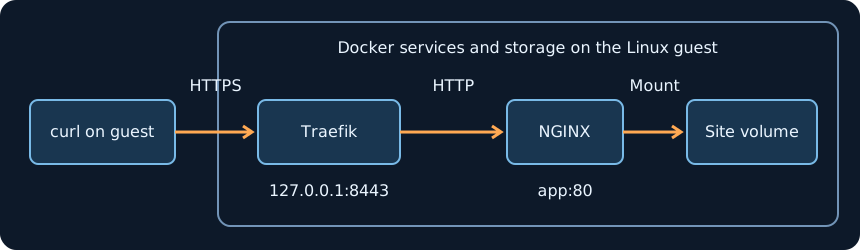
Part 08 set the rules for reaching an administrative application. This part builds the origin on a dedicated Linux guest. Traefik terminates HTTPS, reaches the app by its Docker service name, and reads its routes from a mounted directory. That keeps the Docker API out of the proxy container and gives you a route file to review before deploying a change.
This is a reference lab. It assumes Docker Engine with the Compose v2 plugin, Traefik v3.6, NGINX Alpine, OpenSSL, curl, and a free TCP port 8443 on the guest. Run the commands in a fresh directory on that guest with an account authorized to use Docker. The HTTPS endpoint binds to loopback for the exercise. The bridge carries plaintext HTTP between the two containers on the same host.
1. Generate a lab certificate
The certificate has a DNS subject alternative name for app.example.com. The curl commands below trust that exact certificate and resolve the hostname to loopback. Keep the private key on the guest. Use a certificate issued by your organization’s trusted CA or another appropriate issuer for a shared deployment.
|
|
2. Define the HTTPS route and Compose project
The router matches one host on the HTTPS entry point. The backend URL uses the Compose service name app. Docker can assign the replacement container a different address while preserving that name.
|
|
Only the proxy publishes a guest port. Both containers share one Compose bridge, so treat membership in that bridge as permission to reach the backend. Mount the route directory so the file provider can watch it when an editor replaces a route file atomically. For repeatable upgrades, record the exact image digests and use those references in your deployment configuration.
3. Test ingress and persistent data separately
|
|
Both requests should return the marker. A transient 502 immediately after replacement can mean NGINX is still starting. Retry the request after checking docker compose ps. To exercise the router’s default response, keep the TLS name and send a different HTTP Host header:
|
|
Expect HTTP 404 for the unmatched host. From another machine, a request to the guest’s LAN address on port 8443 should fail to connect. Check the bind with docker compose ps if it succeeds.
4. Diagnose failures and roll back
| Symptom | First check |
|---|---|
| TLS verification fails | Check the SAN, expiry, curl hostname, and mounted certificate paths. Use docker compose logs proxy for file loading errors. |
| Matching hostname returns 404 | Check the Host rule and confirm the router loaded on the websecure entry point. |
| Matching hostname returns 502 | Check docker compose ps and docker compose logs app. Confirm both services are on the ingress bridge. |
| The marker disappears after replacement | Check that Compose is using the same project and named volume. A different project name can select a different volume. |
Keep the known-good Compose and route files before making changes. To roll back an image or route update, restore those files and the known-good image references, run docker compose up -d, and rerun the HTTPS and marker tests. To stop the exercise, run docker compose down without --volumes. An application upgrade that changes its data format may also require a compatible data restore. The marker test checks container replacement only. Part 10 will cover recovery after losing the guest or its storage.
For a shared deployment, decide which clients should reach the origin before changing its bind. For instance, a tunnel connector running directly on the same guest can use the loopback endpoint with origin TLS verification and the matching server name. Use the Part 08 access checks to verify the identity policy separately from proxy health.