
Series: GNTECH Infrastructure Deployment Series · Part 05 of 12 · Previous: Part 04 — Proxmox Firewall and Network Isolation · Next: Part 06 — Active Directory and DNS
Part 04 — Proxmox Firewall and Network Isolation establishes the forwarding and isolation policy that this installment extends. A site-to-site VPN connects selected services after home and Hetzner networks have separate boundaries. This generic tutorial uses WireGuard on RouterOS v7 and explicit routes between example subnets. Addresses, keys, endpoints, and rules are examples, not copied from a live GNTECH configuration. Nothing here was applied to or tested on live infrastructure.
Scope and topology
Connect only a home server VLAN and a workload subnet routed by one selected Hetzner CHR. Do not bridge Ethernet, send all Internet traffic through the tunnel, or expose Proxmox management.
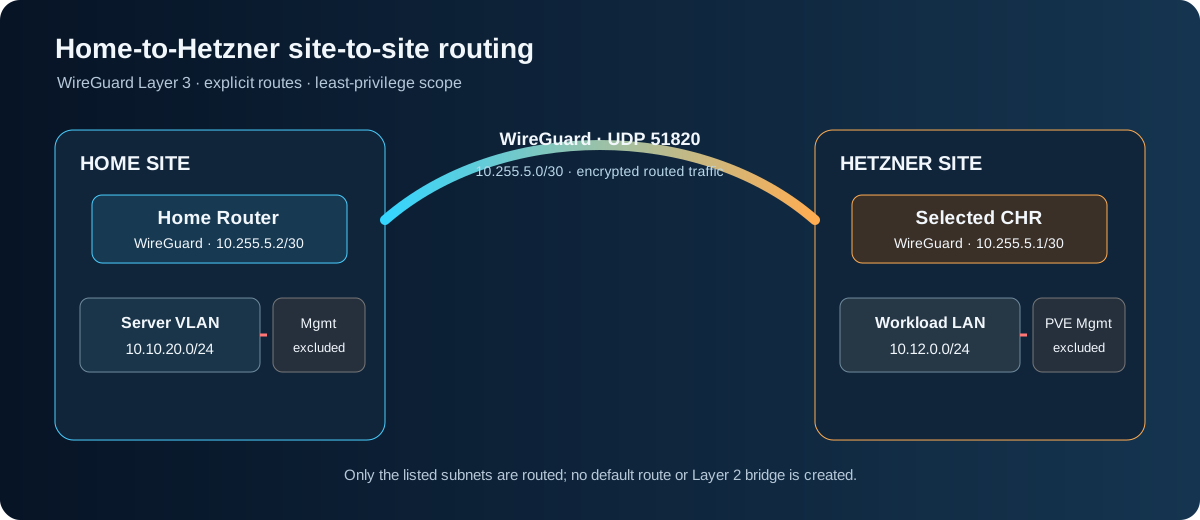
| Role | Example | Purpose |
|---|---|---|
| Home server VLAN | 10.10.20.0/24 | Approved service access |
| Home user and management VLANs | 10.10.10.0/24 and 10.10.99.0/24 | Excluded |
| Hetzner workload LAN | 10.12.0.0/24 | Routed behind the selected CHR |
| Tunnel | 10.255.5.0/30 | Point-to-point WireGuard addresses |
| Hetzner endpoint | 198.51.100.20:51820 | Documentation-only address |
198.51.100.20 is reserved for examples. Replace it privately with the endpoint routed to your CHR, and verify the provider’s addressing model first.
Endpoint choices
- With a reachable home public address, either peer can initiate; use maintained DNS if it changes.
- Behind CGNAT, have the home router initiate to the reachable Hetzner CHR. The CHR learns the home endpoint from the authenticated handshake; a keepalive maintains the NAT mapping.
- If neither side is reachable, use a design with a reachable relay.
Cloudflare Tunnel is separate; this example does not use it to route arbitrary IP traffic.
1. Preflight and recovery
Inspect addresses, routes, firewall ordering, WAN interface lists, and NAT rules on both routers. Save a private backup and encrypted export. Do not publish an export because it can contain secrets and identifying details.
/system/resource/print
/interface/print
/ip/address/print
/ip/route/print detail
/ip/firewall/filter/print
/ip/firewall/nat/print
Confirm that the example LANs do not overlap, the selected CHR routes the workload LAN, UDP 51820 can reach it, and both routers have independent local/provider recovery. Stop if you cannot recover either router without this tunnel.
2. Configure WireGuard
On the Hetzner CHR:
/interface/wireguard/add name=wg-home-hz listen-port=51820 mtu=1420 comment="Home to Hetzner example"
/ip/address/add address=10.255.5.1/30 interface=wg-home-hz comment="WireGuard transit example"
On the home router:
/interface/wireguard/add name=wg-hetzner mtu=1420 comment="Home to Hetzner example"
/ip/address/add address=10.255.5.2/30 interface=wg-hetzner comment="WireGuard transit example"
RouterOS generates a private/public key pair. Keep each private key on its own router and exchange only public keys through a private authenticated channel.
On home, configure the CHR public key and endpoint. Keepalive is useful when home is behind NAT:
/interface/wireguard/peers/add interface=wg-hetzner public-key="<CHR_PUBLIC_KEY>" endpoint-address=198.51.100.20 endpoint-port=51820 allowed-address=10.255.5.1/32,10.12.0.0/24 persistent-keepalive=25s comment="Hetzner workload peer"
On the CHR, configure home. For the CGNAT pattern, omit its endpoint so it learns the address from the handshake:
/interface/wireguard/peers/add interface=wg-home-hz public-key="<HOME_PUBLIC_KEY>" allowed-address=10.255.5.2/32,10.10.20.0/24 comment="Home server VLAN peer"
Replace the placeholders; do not paste private keys into commands, chat, tickets, or a repository. Allowed addresses bind peer traffic to the expected tunnel address and remote subnet, but do not replace forward-chain policy.
Permit UDP 51820 to the CHR in its input chain before WAN drop rules. This assumes the actual interface list is WAN; verify it and the upstream provider/host boundary before adding the rule:
/ip/firewall/filter/add chain=input action=accept protocol=udp dst-port=51820 in-interface-list=WAN comment="Allow WireGuard from WAN"
3. Add routes and restrict forwarding
Add one static route on each router:
/ip/route/add dst-address=10.12.0.0/24 gateway=wg-hetzner comment="Home to Hetzner workload subnet"
/ip/route/add dst-address=10.10.20.0/24 gateway=wg-home-hz comment="Hetzner to home server VLAN"
Use the matching route on each side. Do not advertise a default route or management VLAN.
Permit only these source and destination networks in both directions, before the existing final drop. The first pair is for the Hetzner CHR; the second is for the home router. Interface direction changes because packets enter and leave each router on opposite sides:
Hetzner CHR:
/ip/firewall/filter/add chain=forward action=accept in-interface=wg-home-hz src-address=10.10.20.0/24 dst-address=10.12.0.0/24 comment="Home servers to Hetzner workloads"
/ip/firewall/filter/add chain=forward action=accept out-interface=wg-home-hz src-address=10.12.0.0/24 dst-address=10.10.20.0/24 comment="Hetzner workloads to home servers"
Home router:
/ip/firewall/filter/add chain=forward action=accept out-interface=wg-hetzner src-address=10.10.20.0/24 dst-address=10.12.0.0/24 comment="Home servers to Hetzner workloads"
/ip/firewall/filter/add chain=forward action=accept in-interface=wg-hetzner src-address=10.12.0.0/24 dst-address=10.10.20.0/24 comment="Hetzner workloads to home servers"
Review source NAT. A masquerade rule limited to WAN should not match the tunnel. If your existing rule is broad, add a narrow no-NAT exception before it. Do not use NAT to hide a missing return route.
4. Validate and roll back
Inspect peer state without sharing private keys, then verify each route:
/interface/wireguard/peers/print detail
/ip/route/print detail where dst-address=10.12.0.0/24
/ip/route/print detail where dst-address=10.10.20.0/24
Look for a recent handshake and increasing rx/tx counters after traffic. Test one approved service from a host in each subnet. Ping failure is inconclusive because ICMP may be filtered; check firewall counters and the service listener.
Negative tests: the home user VLAN cannot reach the cloud subnet; neither site reaches the other’s management network through this peer; Internet traffic keeps its local WAN; and the Proxmox host remains reachable through its independent recovery path with the tunnel disabled.
| Symptom | Check |
|---|---|
| No handshake | Endpoint, UDP filtering, input rule order, public keys, initiating peer |
| Handshake but no subnet access | Allowed addresses, both routes, forward rules, overlapping LANs |
| One-way access | Return route, reverse rule, connection tracking, broad NAT |
Rollback by disabling both peers, removing only the routes and rules added for this change, then removing addresses and interfaces. Keep independent console sessions open until local Internet and management are rechecked. Never flush the firewall or remove unrelated routes.
What this does not prove
This is not a deployed GNTECH tunnel. It does not validate provider routing for a specific allocation, existing firewall order, application ports, failover, or throughput. Reconcile the example with current devices and provider documentation before applying it.