
Series: GNTECH Infrastructure Deployment Series · Part 06 of 12 · Previous: Part 05 — Home-to-Hetzner Connectivity · Next: Part 07 — Hybrid Identity and Entra ID
This installment builds a new, isolated Windows Server 2025 lab forest and explains the DNS records Active Directory needs. It does not configure, extend, or test the existing GNTECH.ME domain. Do not run the new-forest commands in a production environment.
Active Directory Domain Services (AD DS) stores directory objects and provides authentication. DNS lets clients locate domain controllers and services through SRV records. A domain controller depends on DNS, so client and server resolver settings are part of the directory design, not an afterthought.
Lab design
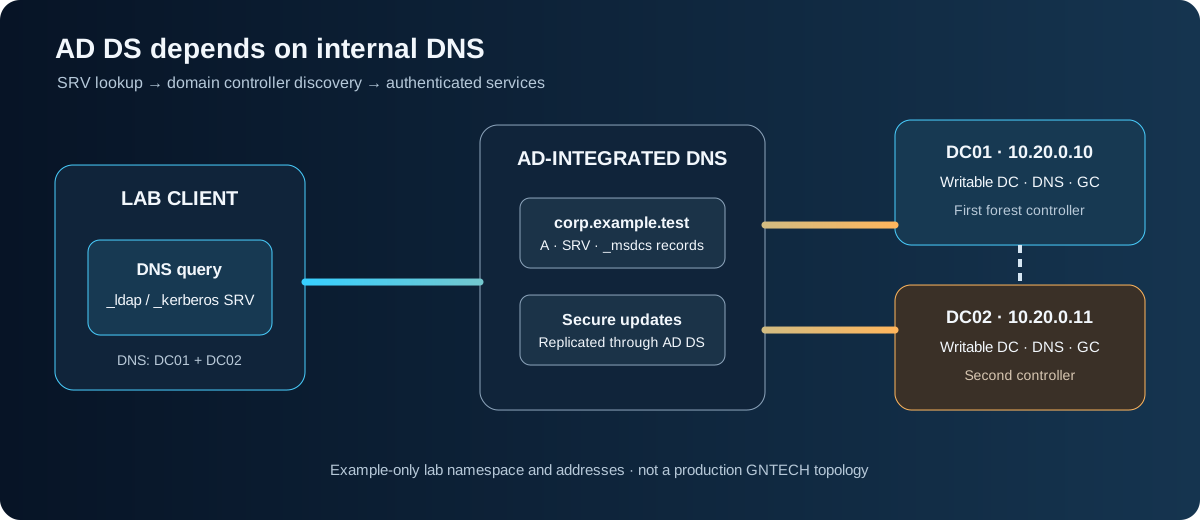
| Component | Example | Role |
|---|---|---|
| Forest/domain | corp.example.test | Isolated lab namespace; never use this reserved test name in production |
| NetBIOS name | CORP | Short domain logon label |
| DC01 | 10.20.0.10 | First writable DC, global catalog, AD-integrated DNS |
| DC02 | 10.20.0.11 | Second writable DC, global catalog, AD-integrated DNS |
| Lab clients | 10.20.0.0/24 | Use only the lab DNS servers |
For a real organization, choose a subdomain of a DNS name your organization owns, such as ad.example.com when example.com is yours. Do not use .local, a public vendor domain, or an internal name that may collide with an existing namespace. The documentation-only .test name here is reserved for examples.
1. Plan and protect the lab
Use two supported Windows Server 2025 VMs on an isolated network. Give each a fixed address, unique hostname, current updates, synchronized time, and adequate storage. Keep management access separate from the test client network. Do not expose LDAP, Kerberos, SMB, or DNS directly to the public Internet.
Before installing AD DS, record the chosen subnet, gateway, DNS behavior, VM snapshot/backup method, and recovery console. Ensure there is no DHCP server or existing domain using the sample network. A VM snapshot is useful for a disposable lab checkpoint but is not an Active Directory system-state backup.
Check the server name, addressing, and routes in elevated PowerShell:
Get-ComputerInfo | Select-Object CsName, WindowsProductName, WindowsVersion
Get-NetIPConfiguration
Get-NetRoute -AddressFamily IPv4 | Sort-Object RouteMetric
Set the hostname and a static address through your approved lab process, then restart before adding the role. The address and interface below are examples; replace them only after confirming the correct NIC and unused subnet:
Rename-Computer -NewName DC01 -Restart
Do not paste this hostname command into an existing server. Configure DNS on a member server or client to use the future domain DNS service only after it is available.
2. Install the first domain controller
On the new DC01 lab VM, set its static address to 10.20.0.10/24. During initial promotion, use its own static address for DNS or the documented loopback resolver configuration; do not point it at a public resolver. Install the role and management tools:
Install-WindowsFeature AD-Domain-Services -IncludeManagementTools
Create a new forest only on this disposable lab VM. PowerShell prompts for the Directory Services Restore Mode password; store that recovery secret in an approved password manager, not in scripts or Git:
Install-ADDSForest -DomainName "corp.example.test" -DomainNetbiosName "CORP" -InstallDNS
Review the prerequisite checks before confirming. The server restarts during promotion. DNS Server is installed with a new forest when requested by the AD DS deployment cmdlet. The domain and forest functional levels are chosen by the installer defaults for that Windows Server release; do not raise levels in an existing forest as part of this lab.
After restart, sign in using the new domain context and confirm the basic directory state:
Get-ADDomain | Select-Object DNSRoot, NetBIOSName, DomainMode
Get-ADForest | Select-Object Name, ForestMode, GlobalCatalogs
Get-Service NTDS, DNS, Netlogon
3. Confirm the DNS namespace and locator records
Inspect zones and query the AD service locator records. These lookups verify that clients can discover domain controllers for LDAP and Kerberos:
Get-DnsServerZone
Resolve-DnsName -Type SRV _ldap._tcp.dc._msdcs.corp.example.test
Resolve-DnsName -Type SRV _kerberos._tcp.corp.example.test
dcdiag /test:dns /v
Check that the returned targets resolve to the expected lab controller address. If a lookup fails, inspect the client resolver setting, DNS service state, zone contents, and event logs before changing records manually.
AD-integrated zones replicate through Active Directory. For the lab’s internal domain zone, use secure dynamic updates when appropriate. Do not create broad unsecured dynamic updates just to make a registration succeed.
Configure DNS forwarders on the internal DNS servers if lab systems need external name resolution. Domain clients should query the internal AD DNS servers; those servers can forward external queries upstream. Do not give domain clients a public resolver as an alternate DNS server, because clients may bypass AD’s internal records and fail to locate a domain controller.
4. Add a second domain controller
Build a second supported Windows Server VM on the same routed lab network. Name it DC02, set its static address to 10.20.0.11/24, and set its preferred DNS server to DC01 (10.20.0.10) before joining or promoting it. Confirm that it can resolve the domain and reach DC01.
Install the role, then promote DC02 as an additional writable domain controller and DNS server. Use credentials authorized for adding a controller to this forest; store and enter them interactively:
Install-WindowsFeature AD-Domain-Services -IncludeManagementTools
$Credential = Get-Credential
Install-ADDSDomainController -DomainName "corp.example.test" -InstallDNS -Credential $Credential
Review prerequisites and confirm the restart. After promotion, configure each DC’s DNS client settings to use the other DC as preferred and itself as an alternate according to Microsoft’s current DNS guidance for your topology. Configure DHCP option 006 for domain clients to hand out only reachable internal AD DNS servers.
Verify both controllers, replication, and DNS:
Get-ADDomainController -Filter * | Select-Object HostName, IPv4Address, Site, IsGlobalCatalog
repadmin /replsummary
dcdiag /e /test:dns
Resolve-DnsName -Server 10.20.0.11 -Type SRV _ldap._tcp.dc._msdcs.corp.example.test
Do not declare the second controller ready until replication is healthy and both DNS servers return the expected locator records.
5. Join a disposable client and test discovery
Use a disposable Windows client attached only to the lab network. Configure its DNS resolver to 10.20.0.10 and 10.20.0.11. Then test domain discovery and time before joining:
ipconfig /all
Resolve-DnsName -Type SRV _ldap._tcp.dc._msdcs.corp.example.test
nltest /dsgetdc:corp.example.test
w32tm /query /status
Join the client only after name resolution and routing work. Confirm that the client can locate a controller, authenticate with a test account, and resolve an internal host record. Do not use a personal workstation or production account for the lab exercise.
Troubleshooting and rollback
| Symptom | Check |
|---|---|
| Client cannot find a DC | DNS server addresses, SRV query, subnet routes, and UDP/TCP 53 reachability |
| DC promotion prerequisite fails | Static IP, name, time, credentials, existing DNS conflicts, and event logs |
| DC02 is not replicating | DNS resolution between DCs, AD Sites/subnets, firewall policy, and repadmin output |
| External names fail but internal names work | DNS forwarder configuration and outbound resolver reachability |
For a disposable lab, stop the test VMs and restore the documented checkpoint or rebuild the forest if promotion fails. For an existing domain, do not use snapshot rollback or remove a domain controller as an ad hoc recovery method. Follow a tested system-state recovery and demotion procedure, preserve DNS and FSMO dependencies, and use an independent administrative path.
Back up domain controllers using an AD-aware backup product and perform a documented system-state recovery test. A copied VM disk or an untested snapshot alone does not prove that the directory can be restored.
What this lab does not prove
This procedure creates a separate test forest. It does not validate GNTECH.ME, the user’s existing domain controllers, Microsoft Entra ID synchronization, production DHCP, or a production network’s firewall and DNS design. Part 07 will cover hybrid identity planning separately.